
If you make AI videos, you already know the voiceover is half the magic. And you’ve probably looked at ElevenLabs, loved how it sounds, and then closed the tab when you saw the monthly price.
Here’s the good news: Google has a voiceover tool that sounds amazing and costs nothing to use. It’s called Google AI Studio, and I’ve been using it for my own video voiceovers.
If you came here from my video, the direct link is right below. Click the button, sign in with your Google account, and you’re ready to go.
How to Use Google AI Studio for Voiceovers (Step by Step)
Step 1: Click the button at the top of this post, or search “Google AI Studio” on Google. Sign in with your normal Gmail account, and you’ll land on the speech generation page.
Step 2: Choose single speaker for a normal voiceover. Pick multi-speaker only if you want a two-person conversation.
Step 3: Open the voice list and listen to a few voices. Take your time here, because the right voice makes a huge difference.
Step 4: Paste your script into the text box. You can also add a short style instruction at the start, like “Say in a friendly, energetic tone:”
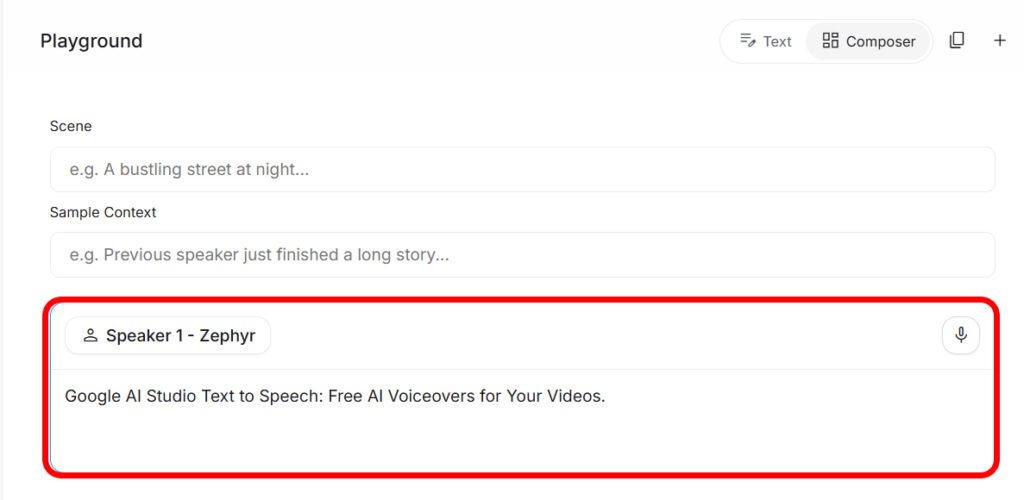
Step 5: Click Run, wait a few seconds and listen. If you like it, click the download button to save the audio, then drop it into CapCut or any video editor.
Pro Tips for Better Voiceovers
Use audio tags for emotion. You can put little tags like [excited], [whispers], [laughs] or [serious] inside your script to change how specific lines are spoken. For example:
[excited] Aaj main aap ko ek zabardast free tool batata hoon! [whispers] Aur ye bilkul free hai.
Write tags in English, even for Urdu scripts. Google recommends that if your script isn’t in English, you should still use English audio tags for the best results.
Keep each voiceover short. Quality can start to drift when the audio is longer than a few minutes, so split long scripts into smaller parts and generate them one by one. For Shorts and Reels, this won’t be a problem at all.
Try Urdu script if Roman Urdu sounds odd. If you write in Roman Urdu (like “aap kaise ho”), the AI sometimes mispronounces words. If that happens, paste the same script in proper Urdu script, and the pronunciation usually gets much better.
Match the voice to your style. If the voice doesn’t match the mood you’re asking for, the result can sound strange. An upbeat voice like Puck works best for fun content, while a calmer voice suits tutorials.
One of the best things about Google AI Studio is its support for Hindi and Urdu. If you’re from Pakistan or India and want to create AI voiceovers in your own language, it’s a really useful option to have.
Is It Really Free?
Yes, using speech generation inside Google AI Studio is free. You just need a Google account.
A couple of honest notes though. The text-to-speech feature is currently marked as Preview, which means Google is still improving it and could change how it works or add usage limits in the future. If you ever hit a limit, just wait a while and try again.
Also, if you plan to use the voiceovers in commercial projects or client work, take a minute to read Google’s terms of use first.
Google AI Studio vs ElevenLabs
Google AI Studio is free, supports Urdu and Hindi, and gives you great emotion control. It’s perfect for Shorts, Reels, tutorials and AI story videos.
ElevenLabs is still excellent, especially for features like voice cloning and its huge voice library. But for most creators making everyday videos, Google AI Studio does the job beautifully without the monthly bill.
Create Free AI Voiceovers
Open Google AI Studio’s speech generator directly. Just sign in with your Google account.
✔ Official Google link
Frequently Asked Questions
Do I need to install anything?
No. It works in your browser on both computer and phone.
Can it speak in Urdu?
Yes. Urdu is officially supported, and the AI detects the language automatically.
Can I use my own voice?
Not in AI Studio. You can only choose from the built-in voices.
What format is the downloaded audio?
It’s usually a WAV file, which works in every video editor, including CapCut.
Final Thoughts
You don’t need an expensive subscription to get professional voiceovers anymore. Google AI Studio gives you natural-sounding voices, Urdu and Hindi support, and emotion control, all for free.
If you’re making AI videos, pair this with my AI baby video prompts or my hydraulic press AI video prompt for a complete free workflow. And follow me at @techwithtaimoor for more tools like this!